


An AI coding agent reads your codebase, edits files, runs commands and tests, and opens a pull request on its own. That is a different product from the autocomplete most developers tried in 2023, and the market has split into four shapes: terminal agents, editor agents, cloud agents and open-source agents where you bring your own model key. We ship client websites with these tools every week, so this list is written from that seat: what each agent costs in October 2026, what shape it is, and which job it is good at. Prices come from each vendor's own page and are linked, because three of the four ranking articles on this topic still quote plans that no longer exist.
The agents at a glance
| Agent | Shape | Entry price (USD, monthly) | Best for |
|---|---|---|---|
| Claude Code | Terminal, IDE, desktop, web, cloud | $20 (Claude Pro) | Whole features from a brief, agency site builds |
| OpenAI Codex | CLI, IDE extension, web | $20 (ChatGPT Plus); $8 Go on desktop | Teams already on ChatGPT |
| Cursor | Editor first, cloud agents on Premium | $8 Plus (Grok only); $30 Premium | Developers who live in the editor |
| GitHub Copilot coding agent | Editor plus cloud agent in GitHub | $10 Pro with $10 AI credits | Teams whose work is already in GitHub issues |
| Devin (formerly Windsurf) | Desktop app and cloud engineer | Pro reported at $20 [unverified] | Long autonomous tasks with a review step |
| Antigravity (replaced Gemini CLI) | App, CLI, IDE, SDK | No charge for individuals | Google Workspace shops, free experiments |
| Jules | Cloud agent that returns a PR | Free, 15 tasks a day | Small, well-described tickets |
| Amp | Editor and CLI agent | Free Hobby; $20 Individual | Bring-your-own-key users who hate markups |
| Cline | Open-source editor agent | Free, pay only for model inference | Privacy-first teams, any model provider |
| Roomote (from the Roo Code team) | Self-hosted or cloud agent platform | Free self-hosted up to 10 users; $49 cloud | Teams that want agents on their own servers |
What an AI coding agent is and how it differs from an assistant
An assistant suggests the next line. An agent is given a goal and works toward it: it searches the repo, plans, edits several files, runs the test suite, reads the failures and tries again. The vendor docs describe the same loop in different words. Anthropic's Claude Code docs talk about hooks, subagents and cloud sessions; GitHub's coding agent docs describe a cloud environment that runs for up to 59 minutes and returns one pull request per task.
The four shapes matter more than the brand names, because they decide how the agent fits your day:
- Terminal agents (Claude Code, Codex CLI, Antigravity CLI) run beside your editor and can be scripted or scheduled.
- Editor agents (Cursor, Copilot in VS Code, Cline, Amp) keep the diff in front of you as it happens.
- Cloud agents (Jules, Copilot coding agent, Claude Code cloud sessions, Devin) work on a VM while you do something else and hand back a PR.
- Open-source, bring-your-own-key agents (Cline, Codex CLI, Roomote self-hosted) cost nothing beyond the model tokens and keep code on infrastructure you choose.
The agents we rate in 2026 and what each costs
1. Claude Code
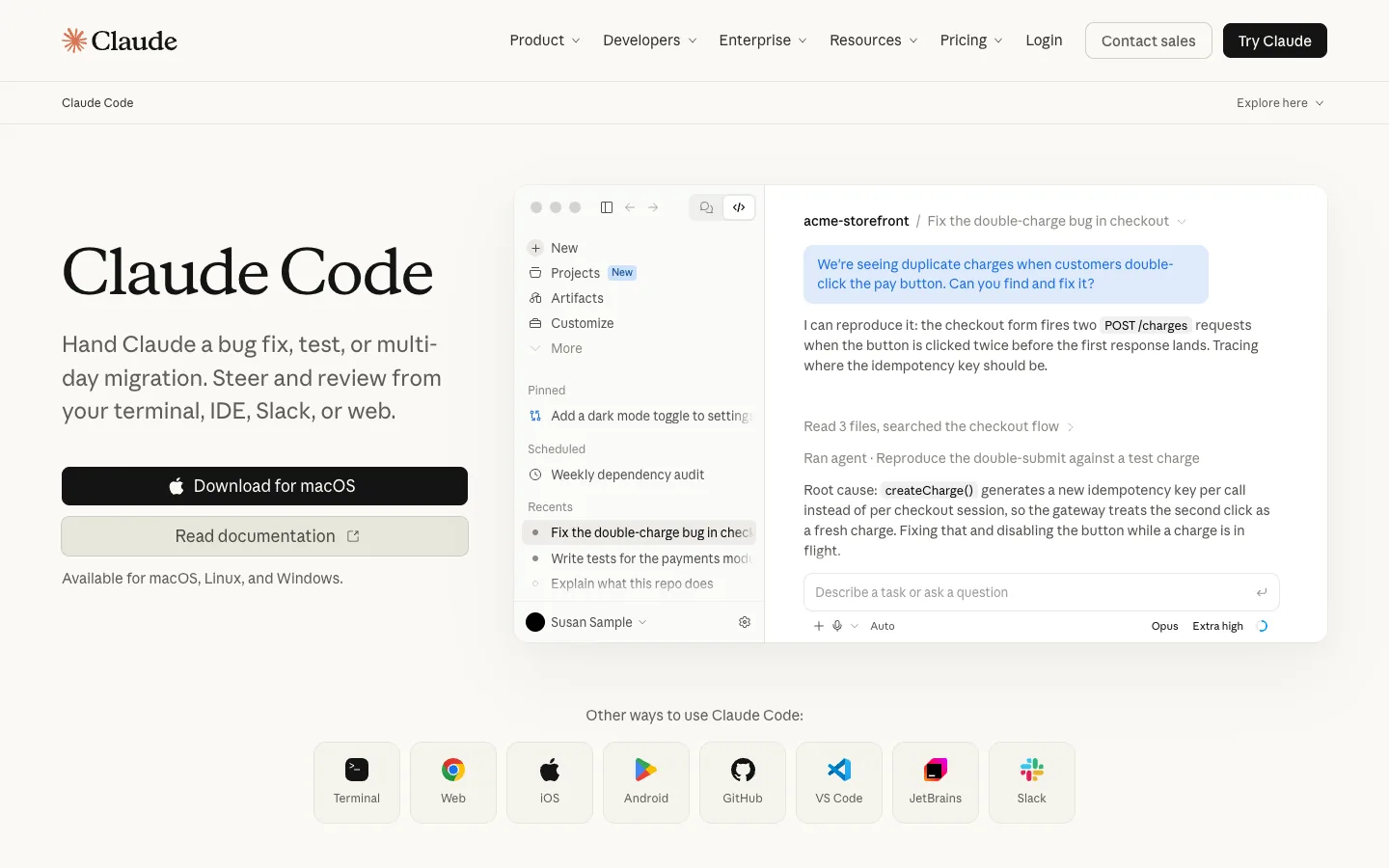
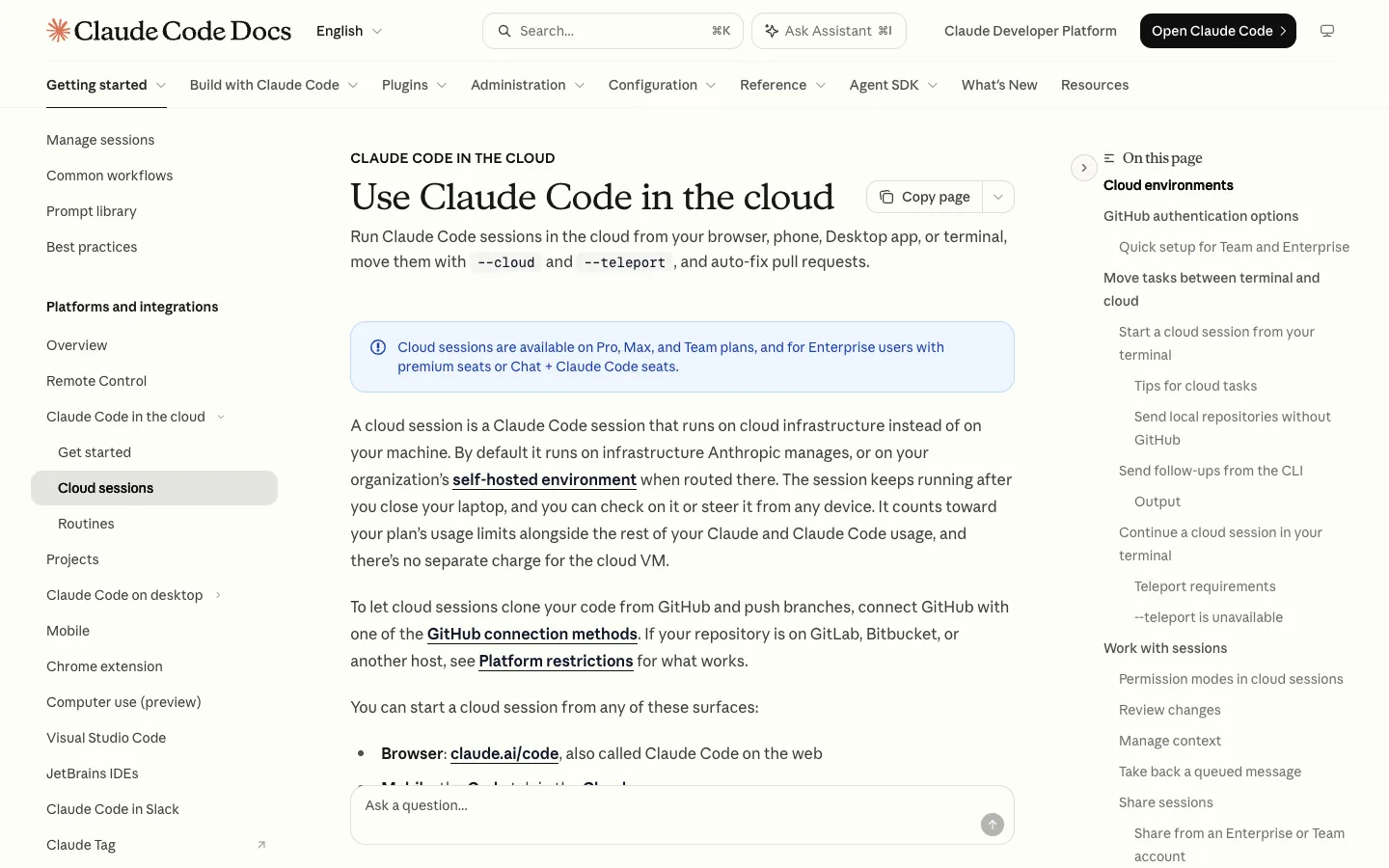
Our daily tool, so we put it first and say why. It is included in Claude Pro at $20 a month, Max at $100 or $200, and Team and Enterprise seats; the Free plan excludes it, per Claude's pricing. The parts that make it earn its keep on client work: a CLAUDE.md that carries the brief, hooks that run lint and tests after every edit, subagents for parallel jobs, MCP servers (we use the Webflow one to write CMS items and build pages), and cloud sessions that do not stop when the laptop closes. Anthropic's cost page reports an enterprise average of about $13 per developer per active day for token-billed teams, which is the most honest budgeting number any vendor publishes. Where it slips: it is not an editor, so if you want completions while you type you still need one.
2. OpenAI Codex
Codex is an open-source CLI under Apache 2.0, an IDE extension for VS Code, Cursor and Windsurf, and a web app, per the Codex repository. It signs in with a ChatGPT plan: Plus at $20 covers web, CLI, IDE and iOS; a Free tier and an $8 Go tier exist on desktop; Pro starts at $100, according to OpenAI's pricing docs. Message limits are per five-hour window, like Claude. If your company already pays for ChatGPT, this is the zero-cost pilot.
3. Cursor
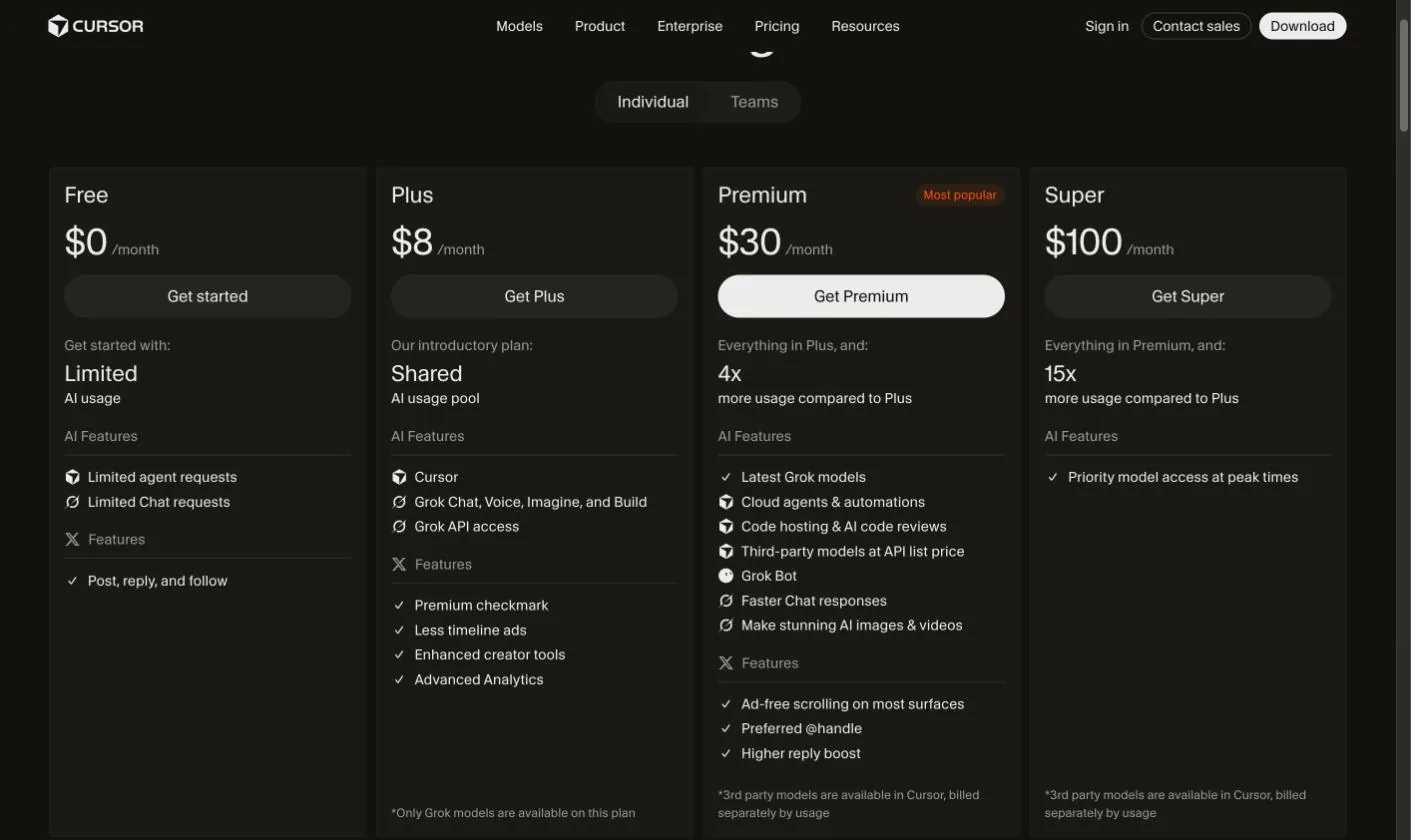
Cursor's Agent can make an unlimited number of tool calls per task and can coordinate other agents on bigger projects, per its docs. The 2026 pricing page is the thing to read twice: Free, Plus at $8 with Grok models only, Premium at $30 with 4x the usage plus cloud agents and Bugbot code review, Super at $100 and Ultra at $200. Third-party models, Claude included, are billed separately at API list price on Premium and above. It remains the best editor experience on this list; it is no longer the cheapest way to run Claude. Our full Claude Code vs Cursor comparison goes deeper.
4. GitHub Copilot coding agent
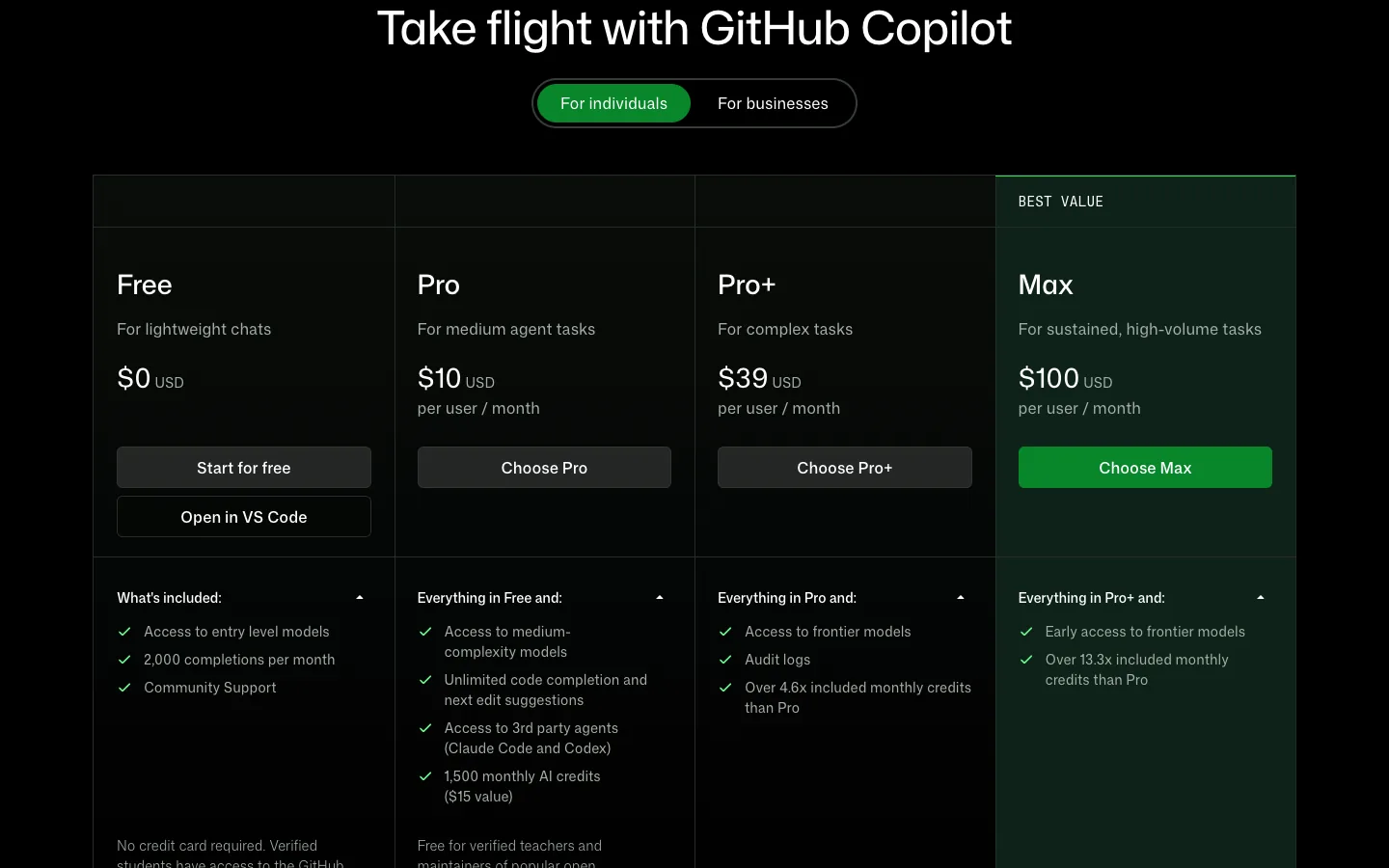
Copilot's cloud coding agent takes an issue, works in an ephemeral environment for up to 59 minutes and opens a pull request, per GitHub's docs. The plans page lists Free (agent mode in the editor, no cloud agent), Pro at $10 with $10 of AI credits, Pro+ at $39 with $39, and Max at $100 with $100, with credits drawing down at $0.01 each. Best for teams whose backlog already lives in GitHub issues. Where it slips: one PR per task and a hard time limit make it a poor fit for exploratory work.
5. Devin, including the former Windsurf
Cognition, which runs Devin, acquired Windsurf in 2025 and rebranded the editor as Devin Desktop in June 2026; the Windsurf pricing URL now redirects to Devin's site. We could not load a live pricing page on 16 October 2026, and third-party write-ups put the self-serve lineup at Free, Pro around $20 and Max around $200 [unverified]. Treat it as a strong cloud engineer for long tasks and confirm the plan before you commit.
6. Antigravity, which replaced Gemini CLI
Google's Gemini CLI repository states that for unpaid and Google One users it was replaced by Antigravity CLI on 18 June 2026. Antigravity ships an app, a CLI (the binary is agy), an IDE and an SDK, and is available at no charge for individuals, with higher limits on Google AI Pro and Ultra. On Google's India page those subscriptions are listed at INR 1,950 and from INR 6,500 a month. Best for Workspace-heavy teams and for anyone who wants a free second opinion on a tricky bug.
7. Jules
Jules is Google's cloud agent: describe the task, it clones the repo into a VM, works, and returns a PR. The base tier gives 15 tasks a day and 3 concurrent, with 100 a day on Google AI Pro and 300 on Ultra, per the usage limits page. Where it slips: it needs a well-described ticket, so vague requests waste the daily quota.
8. Amp
Amp was spun out of Sourcegraph in December 2025 and sells a free Hobby tier, a $20 Individual plan and a Teams plan with pooled credits, with bring-your-own-key supported, per its pricing page. The appeal is zero token markup when you use your own keys. Best for developers who already have Anthropic or OpenAI credits and want an editor agent on top.
9. Cline
Cline is open source and, in its own words on the pricing page, free for individual developers; you pay only for inference from OpenAI, Anthropic or Google. It runs inside VS Code and asks before every file write or command, which privacy-first teams like. Where it slips: you manage the keys and the bills yourself.
10. Roomote, from the Roo Code team
The Roo Code project now points to Roomote: a cloud plan at $49 a month for up to 10 users and a self-hosted edition that is free up to 10 users, under a Fair Core licence where each release becomes Apache 2.0 after two years. Best for teams that want agents running on their own servers with an audit trail.
Not sure which agent your team should pilot?
Tell us your stack, team size and monthly budget. We will send a free one-page recommendation with the plan to buy and the first task to try.
How we pick an agent for a client website build
Brief and spec
The brief becomes a file in the repo (CLAUDE.md or AGENTS.md, which Claude Code also reads). It holds the sitemap, design tokens, the CMS schema and the rules about what the agent must never touch. A terminal agent reads it on every run; an editor agent reads it when you point at it. This step alone removes most of the "the AI did something weird" complaints, because the weirdness was usually a missing instruction.
Build in Webflow or Next.js
For Webflow we use Claude Code with the Webflow MCP server, which can create collections, bulk-write items, build components and publish. For Next.js any of the terminal or editor agents will do the job; the choice comes down to whose model you trust on your framework and what the month costs. Our guide to the website development process in 2026 shows where each step changed.
QA, review and deploy
Cloud agents earn their place here. A Claude Code cloud session or a Jules task can run the full test suite, drive a browser through the forms and write up what broke while a human reviews the diff. Then a person approves the deploy. We have not found an agent we would let publish a client site unattended, and we do not expect to in 2026.
Cost control and limits every small team should know
Three billing patterns cover every agent on this list, and mixing them up is how a $20 plan turns into a $200 month.
| Billing pattern | Who uses it | What to watch |
|---|---|---|
| Flat plan with usage windows | Claude Pro and Max, ChatGPT Plus | Five-hour and weekly caps; credits at API rates once you pass them |
| Plan plus metered credits | Copilot ($0.01 credits), Cursor (third-party models at API price) | The plan price is the floor, not the bill |
| Bring your own key | Cline, Amp, Codex with an API key, Roomote | No markup, but you own the provider invoice and the rate limits |
A workable budget for a two-person studio is one flat plan each plus a small shared API key for scripts and cloud runs. Anthropic's $13 per developer per active day figure is a sensible planning ceiling for the token-billed part.
Spending more on AI tools than you planned?
Send us last month's invoices from your AI coding tools. We will tell you, free, which plan mix would have cost less for the same work.
Frequently asked questions
What is an AI coding agent?
An agent reads your codebase, edits files, runs commands and tests, and opens pull requests on its own, rather than suggesting one line at a time. Claude Code, Codex, Cursor Agent and the Copilot coding agent all fit that definition; Jules and Copilot's cloud agent run entirely in a cloud VM and hand back a PR.
Which AI coding agent is free?
Cline is free and open source and you pay only for model inference. Antigravity is available at no charge for individuals, Copilot Free includes agent mode in the editor, Jules gives 15 tasks a day, and Amp has a free Hobby tier. Claude Code and Codex need a paid plan or an API key, though Codex has a Free and an $8 Go tier on desktop.
Is Cursor still worth it in 2026?
It depends on which model you want. The $8 Plus plan is Grok-only, and Claude or GPT models need Premium at $30 plus separate usage billing. If you rely on Claude, compare that against Claude Pro at $20 with Claude Code included. If the editor experience is what you pay for, Cursor still leads.
How much does an AI coding agent cost per developer?
Anthropic reports about $13 per developer per active day, or roughly $150 to $250 a month, across enterprise Claude Code deployments. Flat plans sit at $20 for Claude Pro, ChatGPT Plus and Amp Individual, with $100 to $200 tiers for heavy use, so a two-person team should budget somewhere between $40 and $400 a month depending on volume.
What replaced Gemini CLI?
For unpaid and Google One users, Google replaced Gemini CLI with Antigravity CLI on 18 June 2026, and the Gemini CLI repository now points users to Antigravity for the newest Gemini models. Antigravity ships an app, a CLI, an IDE and an SDK, with higher rate limits on Google AI Pro and Ultra subscriptions.
Build With Agents, Reviewed by Humans.
We ship Webflow and Next.js sites with AI agents doing the heavy lifting and a designer and developer signing off every page. Get a free scope and quote for your next build.




